
How this converter works
Every shooter turns your view by a fixed amount for each count your mouse reports. That amount is called yaw.
Valorant turns 0.07 degrees per count at sensitivity 1. CS2 and Apex Legends turn 0.022. Overwatch 2 and Call of Duty turn 0.0066.
To keep the same aim, the converter multiplies your sensitivity by the old game's yaw and divides by the new game's yaw.
It also shows cm/360, which is how far your mouse travels for a full turn. If that number matches in two games, your muscle memory carries over.
New sensitivity = old sensitivity × old game yaw ÷ new game yaw. Yaw per count: Valorant 0.07, CS2 and Apex Legends 0.022, Overwatch 2 and Call of Duty 0.0066.
Worked examples
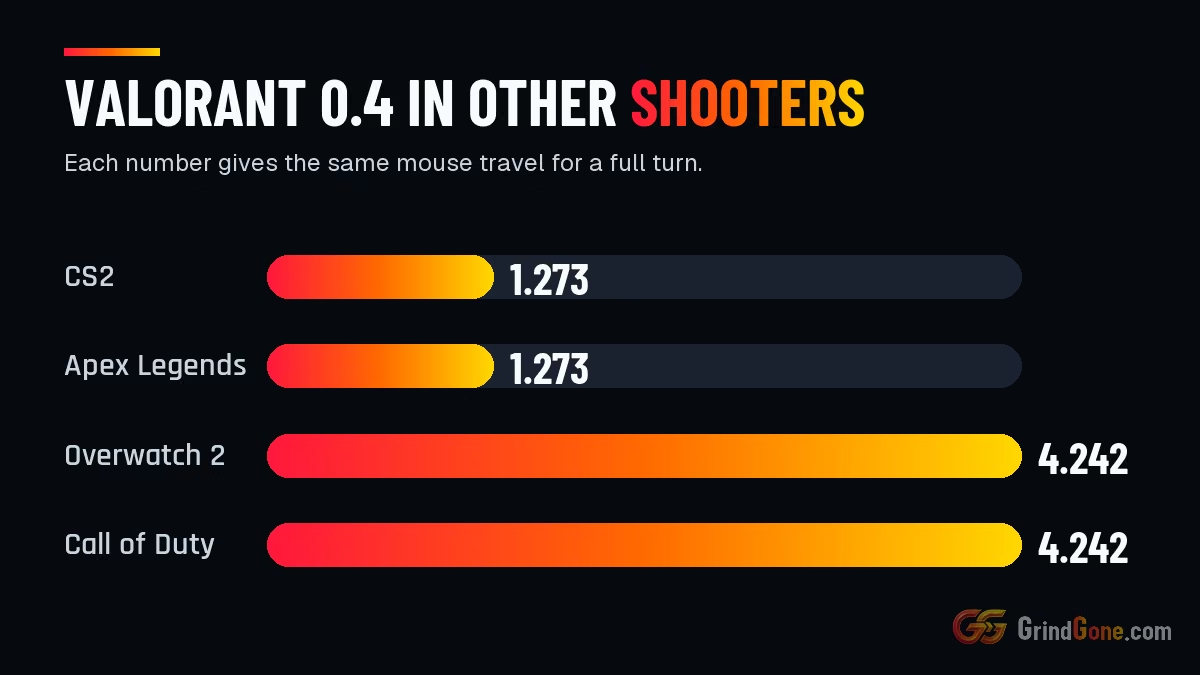
Valorant 0.4 becomes 1.273 in CS2. At 800 DPI both give 40.8 cm for a full turn.
CS2 2.0 becomes 0.629 in Valorant.
Apex Legends 1.5 becomes 5 in Overwatch 2.
| Scenario | Answer |
|---|---|
| Valorant 0.4 to CS2 | 1.273 is your CS2 sensitivity |
| CS2 2.0 to Valorant | 0.629 is your Valorant sensitivity |
| Apex 1.5 to Overwatch 2 | 5 is your Overwatch 2 sensitivity |
Tips that save time
- Keep your DPI the same in every game. Change only the in-game number.
- Round to what the game accepts. Valorant takes three decimals, so 0.629 is fine.
- Match hip-fire first. Scoped sensitivity uses different multipliers in each game, so tune it by feel afterwards.
- Turn off mouse acceleration in Windows and in the game. With it on, no conversion holds.